Group Connections
Group connections enable multiple login methods to be linked to the same on-chain user identity. This means that users logging in with different authentication providers (for example, Google and Email Passwordless) can still access the same wallet address—ensuring a unified user experience.
note
Before setting up a group connection, developers must first configure individual login connections that are eligible.
Set up a group connection
Create a group connection
To use this feature, developers use the Group Connections tab in the dashboard.
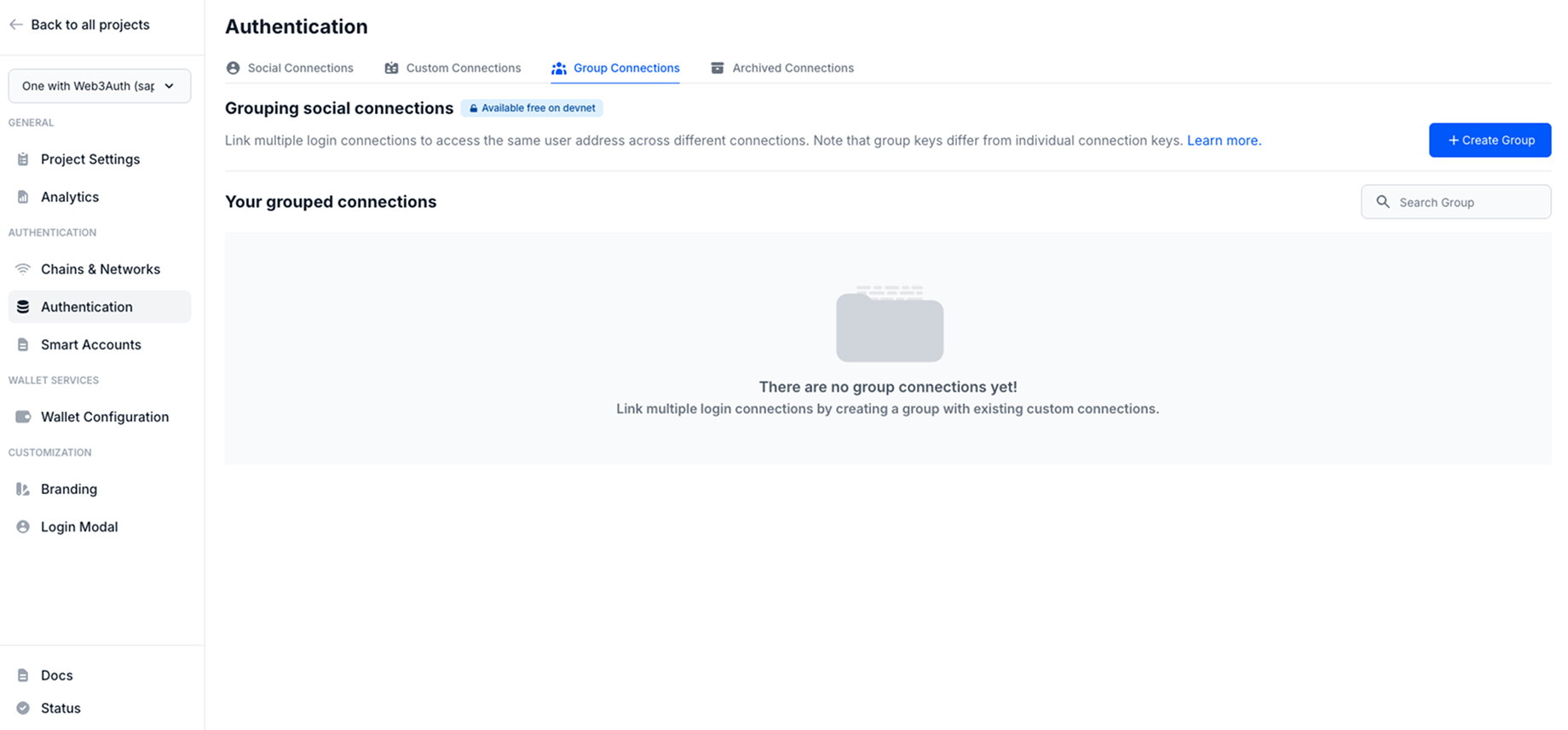
Follow these steps:
- Visit the dashboard.
- Go to the Group Connections section.
- Click on the Create Group button.
- Enter your custom
Group Name. - Select
1st social connectionand2nd social connection. - Click Create Group.
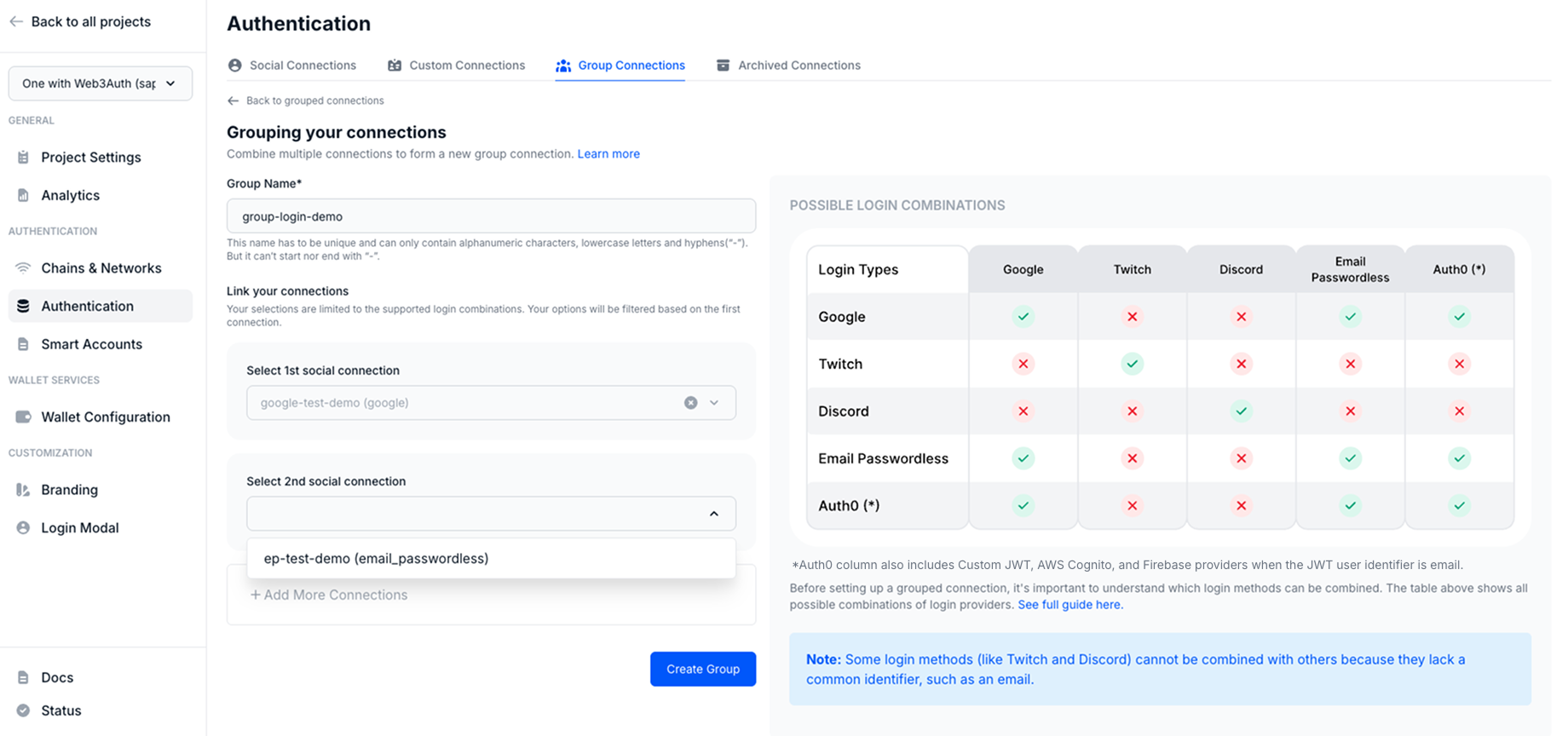

Usage
Since, the group connections details are available from the dashboard, developers don't need to pass any additional parameters to the Web3AuthProvider.
Follow our quickstart to set up the basic flow.
- Modal Connection
- Google [Implicit] + Auth0 [Implicit]
- Google One Tap [JWT] + Auth0 [JWT]
- Google [Implicit] + Firebase [JWT]
web3authContext.tsx
import { WALLET_CONNECTORS, WEB3AUTH_NETWORK } from '@web3auth/modal'
import { type Web3AuthContextConfig } from '@web3auth/modal/react'

const web3AuthContextConfig: Web3AuthContextConfig = {
  web3AuthOptions: {
    clientId: 'YOUR_WEB3AUTH_CLIENT_ID', // Pass your Web3Auth Client ID, ideally using an environment variable
    web3AuthNetwork: WEB3AUTH_NETWORK.SAPPHIRE_MAINNET,
    modalConfig: {
      connectors: {
        [WALLET_CONNECTORS.AUTH]: {
          label: 'auth',
          loginMethods: {
            google: {
              name: 'google login',
              authConnectionId: 'w3a-google',
              groupedAuthConnectionId: 'aggregate-sapphire',
            },
            facebook: {
              name: 'facebook login',
              authConnectionId: 'w3a-facebook',
              groupedAuthConnectionId: 'aggregate-sapphire',
            },
            email_passwordless: {
              name: 'email passwordless login',
              authConnectionId: 'w3a-email-passwordless',
              groupedAuthConnectionId: 'aggregate-sapphire',
            },
          },
        },
      },
    },
  },
}

export default web3AuthContextConfig
App.tsx
const loginWithGoogle = async () => {
  await connectTo(WALLET_CONNECTORS.AUTH, {
    groupedAuthConnectionId: "aggregate-sapphire",
    authConnectionId: "w3a-google",
    authConnection: AUTH_CONNECTION.GOOGLE,
  });
};

const loginWithAuth0Google = async () => {
  await connectTo(WALLET_CONNECTORS.AUTH, {
    groupedAuthConnectionId: "aggregate-sapphire",
    authConnectionId: "w3a-a0-google",
    authConnection: AUTH_CONNECTION.CUSTOM,
    extraLoginOptions: {
      connection: "google-oauth2",
    },
  });
};

const loginWithAuth0GitHub = async () => {
  await connectTo(WALLET_CONNECTORS.AUTH, {
    groupedAuthConnectionId: "aggregate-sapphire",
    authConnectionId: "w3a-a0-github",
    authConnection: AUTH_CONNECTION.CUSTOM,
    extraLoginOptions: {
      connection: "github",
    },
  });
};
App.tsx
const loginWithGoogle = async (response: CredentialResponse) => {
  const idToken = response.credential;

  await connectTo(WALLET_CONNECTORS.AUTH, {
    groupedAuthConnectionId: "aggregate-sapphire",
    authConnectionId: "w3a-google",
    authConnection: AUTH_CONNECTION.GOOGLE,
    idToken,
    extraLoginOptions: {
      isUserIdCaseSensitive: false,
      verifierIdField: "email",
    },
  });
};

const loginWithAuth0 = async () => {
  try {
    await loginWithPopup();
    const idToken = (await getIdTokenClaims())?.__raw.toString();
    if (!idToken) {
      throw new Error("No id token found");
    }

    await connectTo(WALLET_CONNECTORS.AUTH, {
      groupedAuthConnectionId: "aggregate-sapphire",
      authConnectionId: "w3a-a0-github",
      authConnection: AUTH_CONNECTION.CUSTOM,
      idToken,
      extraLoginOptions: {
        isUserIdCaseSensitive: false,
        verifierIdField: "email",
      },
    });
  } catch (err) {
    console.error(err);
  }
};
App.tsx
const loginWithGoogle = async () => {
  await connectTo(WALLET_CONNECTORS.AUTH, {
    groupedAuthConnectionId: "aggregate-sapphire",
    authConnectionId: "w3a-google",
    authConnection: AUTH_CONNECTION.GOOGLE,
  });
};

const loginWithFirebaseGithub = async () => {
  const app = initializeApp(firebaseConfig);
  const auth = getAuth(app);
  const githubProvider = new GithubAuthProvider();

  const result = await signInWithPopup(auth, githubProvider);

  const idToken = await result.user.getIdToken(true);

  connectTo(WALLET_CONNECTORS.AUTH, {
    groupedAuthConnectionId: "aggregate-sapphire",
    authConnectionId: "w3a-firebase",
    authConnection: AUTH_CONNECTION.CUSTOM,
    idToken,
    extraLoginOptions: {
      isUserIdCaseSensitive: false,
    },
  });
};