Key Export Settings
The key export settings allow you to control whether users can programmatically export their private keys using the Web3Auth SDK. This setting provides flexibility for advanced use cases while maintaining security control over sensitive cryptographic material.
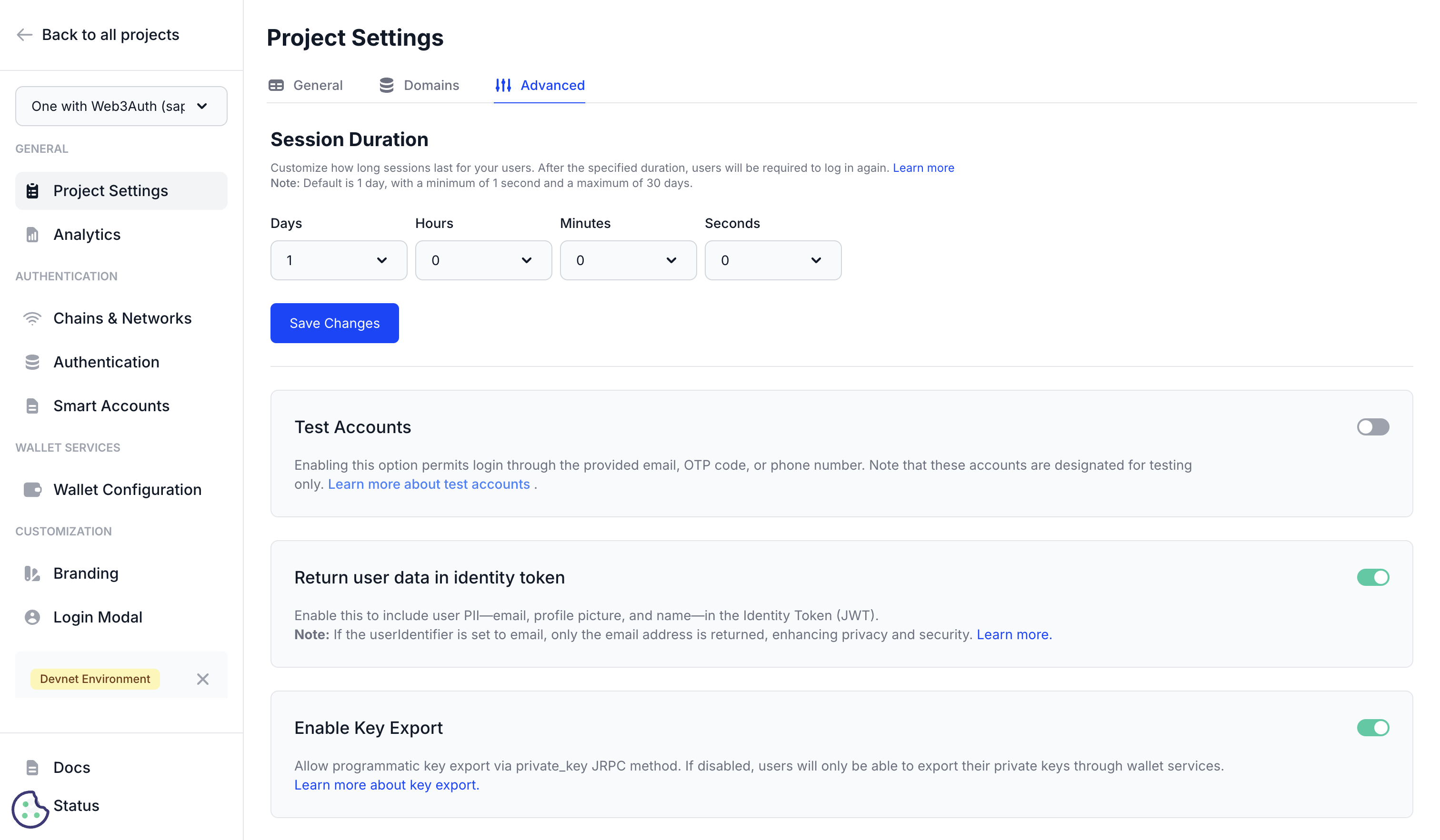
Key export overview
Private key export functionality allows applications to retrieve users' private keys programmatically through the Web3Auth SDK. This capability enables advanced use cases such as wallet migration, multi-platform support, and integration with external services, while requiring careful consideration of security implications.
Export methods
Manual export is always supported to ensure that users retain autonomy over their keys while programmatic export may be configured.
Manual export
- Can't be disabled
- Built into the Web3Auth wallet interface
- User-initiated through wallet UI
Programmatic export
Programmatic export is configurable, providing:
- Access via the
private_keyJSON-RPC method - Requires explicit user consent
- Can be enabled/disabled per project
- Controlled through dashboard settings
Enabling programmatic key export
- Navigate to Project Settings → Advanced → Key Export.
- Locate Enable Key Export toggle.
- Enable the setting to allow programmatic access.
- Save configuration to apply changes.
Disabling programmatic export
When disabled:
- Applications cannot retrieve private keys via SDK
- Users can still export manually through wallet interface
- Enhanced security for applications that don't require key access
- Recommended for most consumer applications
Implementation guide
Programmatic key retrieval
Basic Implementation:
// Ensure user is authenticated
if ((await web3auth.status) !== 'connected') {
  throw new Error('User not authenticated')
}

// Request private key (requires user consent)
try {
  const privateKey = await web3auth.provider.request({
    method: 'private_key',
  })

  // Handle the private key securely
  console.log('Private key retrieved successfully')
  return privateKey
} catch (error) {
  // Handle export rejection or failure
  console.error('Key export failed:', error)
  throw error
}
Secure Implementation Pattern:
class SecureKeyManager {
  async exportKey() {
    // Validate authentication state
    await this.validateAuthentication()

    // Show user confirmation dialog
    const userConsent = await this.getUserConsent()
    if (!userConsent) {
      throw new Error('User declined key export')
    }

    // Retrieve private key
    const privateKey = await web3auth.provider.request({
      method: 'private_key',
    })

    // Process key securely (encrypt, transmit, etc.)
    return await this.processKeySecurely(privateKey)
  }

  async processKeySecurely(privateKey) {
    // Implement your secure processing logic
    // Examples: encryption, secure transmission, temporary storage

    // Always clear sensitive data from memory
    setTimeout(() => {
      privateKey = null
    }, 0)
  }
}
User consent flow
Best Practices for User Consent:
async function requestKeyExport() {
  // Show clear explanation to user
  const consent = await showConsentDialog({
    title: 'Export Private Key',
    message:
      'Your private key will be exported for wallet migration. ' +
      'Keep this key secure and never share it with others.',
    risks: [
      'Anyone with your private key can access your funds',
      'Store the key in a secure location',
      'Consider using a hardware wallet for long-term storage',
    ],
    confirmText: 'I understand the risks and want to export my key',
    cancelText: 'Cancel',
  })

  if (consent) {
    return await exportPrivateKey()
  }

  throw new Error('User declined key export')
}
Use cases for key export
Wallet migration
Cross-Platform Migration:
// Export from Web3Auth for import into other wallets
async function migrateToExternalWallet() {
  try {
    const privateKey = await exportPrivateKey()

    // Generate wallet formats for different platforms
    const walletFormats = {
      metamask: generateMetaMaskFormat(privateKey),
      trustwallet: generateTrustWalletFormat(privateKey),
      hardware: generateHardwareWalletFormat(privateKey),
    }

    return walletFormats
  } catch (error) {
    console.error('Migration failed:', error)
    throw error
  }
}
Multi-chain support
Cross-chain key derivation:
async function deriveKeysForMultipleChains() {
  const basePrivateKey = await exportPrivateKey()

  // Derive keys for different blockchain networks
  const chainKeys = {
    ethereum: deriveEthereumKey(basePrivateKey),
    polygon: derivePolygonKey(basePrivateKey),
    solana: deriveSolanaKey(basePrivateKey),
    bitcoin: deriveBitcoinKey(basePrivateKey),
  }

  return chainKeys
}
Advanced integrations
DeFi protocol integration:
async function integrateDeFiProtocol() {
  // Export key for direct protocol interaction
  const privateKey = await exportPrivateKey()

  // Create wallet instance for advanced operations
  const wallet = new ethers.Wallet(privateKey, provider)

  // Perform complex DeFi operations
  await performAdvancedDeFiOperations(wallet)

  // Clear sensitive data
  wallet.privateKey = null
}
Backup and recovery
Secure backup creation:
async function createSecureBackup() {
  const privateKey = await exportPrivateKey()

  // Encrypt private key for backup
  const encryptedBackup = await encryptKey(privateKey, userPassword)

  // Store encrypted backup securely
  await storeEncryptedBackup(encryptedBackup)

  // Provide recovery instructions to user
  showBackupInstructions(encryptedBackup)
}
Security considerations
Application security
Key handling best practices:
- Minimize exposure: Retrieve keys only when necessary
- Secure transmission: Use HTTPS and encrypted channels
- Memory management: Clear private keys from memory immediately after use
- No persistent storage: Never store private keys in databases or local storage
- Audit logging: Log key export events for security monitoring
Implementation security
class SecureKeyHandler {
  constructor() {
    this.keyBuffer = null
  }

  async handleKeyExport() {
    try {
      // Secure key retrieval
      this.keyBuffer = await this.getPrivateKey()

      // Process immediately
      const result = await this.processKey(this.keyBuffer)

      return result
    } finally {
      // Always clear sensitive data
      this.clearKeyBuffer()
    }
  }

  clearKeyBuffer() {
    if (this.keyBuffer) {
      // Overwrite memory with random data
      crypto.getRandomValues(new Uint8Array(this.keyBuffer.length))
      this.keyBuffer = null
    }
  }
}
User education
Security awareness is vital:
- Educate users about private key security
- Explain the implications of key export
- Provide secure storage recommendations
- Warn against sharing private keys
User interface guidelines
const securityWarnings = {
  beforeExport: [
    'Your private key controls access to your wallet and funds',
    'Never share your private key with anyone',
    'Store your key in a secure, offline location',
    'Consider using a hardware wallet for long-term storage',
  ],

  afterExport: [
    'Your private key has been exported',
    'Ensure it is stored securely and never shared',
    'Delete any temporary copies or screenshots',
    'Consider this key compromised if viewed by others',
  ],
}
Regulatory compliance
It's vital to comply with regulations, always consider:
- Data protection: Ensure key export complies with privacy regulations
- Audit requirements: Maintain records of key export events
- User consent: Obtain explicit consent for key export operations
- Jurisdictional laws: Consider local regulations regarding cryptographic material
Monitoring and analytics
Export event tracking
Analytics implementation
Consider sending a structured analytics event whenever a user exports a private key:
async function trackKeyExport(userId, exportReason) {
  await analytics.track('private_key_exported', {
    user_id: userId,
    timestamp: new Date().toISOString(),
    reason: exportReason,
    user_agent: navigator.userAgent,
    ip_address: await getUserIP(),
    session_id: getSessionId(),
  })
}
Security monitoring
Consider monitoring key export attempts to flag suspicious patterns such as repeated exports:
class KeyExportMonitor {
  constructor() {
    this.exportAttempts = new Map()
  }

  async monitorExport(userId) {
    const attempts = this.exportAttempts.get(userId) || 0

    // Flag suspicious activity
    if (attempts > 5) {
      await this.flagSuspiciousActivity(userId)
    }

    // Track export attempt
    this.exportAttempts.set(userId, attempts + 1)

    // Reset counter after 24 hours
    setTimeout(
      () => {
        this.exportAttempts.delete(userId)
      },
      24 * 60 * 60 * 1000
    )
  }
}
Alternative approaches
Disable key export
Consider disabling key export for:
- Consumer-facing applications
- Applications handling high-value assets
- Regulated financial services
- Applications with strict security requirements
These alternative approaches can be leveraged to enable users to sign transactions without exposing or exporting private keys:
- Web3Auth's built-in wallet interface
- Use multi-signature schemes
- Leverage Web3Auth's session-based authentication
- Implement transaction signing without key exposure (see example below)
Transaction-only access
Use web3auth.provider.request to sign transactions directly through Embedded Wallets without exposing the private key:
// Sign transactions without exposing private key
async function signTransaction(transactionData) {
  // Use Web3Auth's provider directly
  const signedTransaction = await web3auth.provider.request({
    method: 'eth_signTransaction',
    params: [transactionData],
  })

  return signedTransaction
}
Troubleshooting
Key export disabled
- Verify setting is enabled in dashboard
- Check project configuration
- Confirm user permissions
Export method not available
- Ensure Web3Auth SDK is properly initialized
- Verify user is authenticated
- Check for browser compatibility issues
User consent failures
- Implement proper consent flow
- Provide clear security information
- Handle user rejection gracefully
Error handling
Troubleshooting is more quickly resolved with robust error management:
async function safeKeyExport() {
  try {
    await validateExportPermissions()
    const key = await exportPrivateKey()
    return key
  } catch (error) {
    if (error.code === 'EXPORT_DISABLED') {
      throw new Error('Key export is disabled for this project')
    } else if (error.code === 'USER_REJECTED') {
      throw new Error('User declined key export')
    } else {
      console.error('Unexpected error:', error)
      throw new Error('Key export failed')
    }
  }
}
Next steps
- User details in ID token: Configure user data in JWT tokens
- Session management: Control session duration and behavior
- Project settings: Configure basic project information